
Monitor under $100: size, panel and ports to check
A monitor under $100 can work well for home and office if you check size, panel type and ports. Here is what to look at and what the price will not give you.
Hamza Idrissi4 min read

Under $100, buy a 22 to 24 inch Full HD monitor with an IPS panel. Check that it has the port your computer uses. That is a safe buy for documents, video calls and video.
Most of what is sold for the money is fine. The mistakes are in ports, panel type and bad stand fit.
The three numbers that matter
Size and resolution. At 22 to 24 inches, Full HD (1920 by 1080) looks sharp enough. Bigger screens at this price stretch the same pixels, so text looks softer.
Panel type. IPS panels usually have better colors and wider viewing angles. VA panels often have deeper blacks but can look washed at angles. TN panels are cheap and can look pale from the side. For general use, pick IPS if you can.
Refresh rate. 60 Hz is standard and fine for work. Some budget monitors offer 75 Hz or more. That helps with mouse movement and games, but it is a small bonus.
Ruling: buy IPS, Full HD, 22 to 24 inch. Treat the rest as extras.
What the money gets you
At this price you get
- A sharp enough picture for text, web and video.
- A tilt stand on most models.
- HDMI and sometimes VGA or DisplayPort.
- Low glare on many matte screens.
At this price you do not get
- Height adjustment on the stand. Use a stack of books or a cheap riser.
- Color accuracy for photo or video work.
- USB-C charging from the monitor. That is rarer and costs more.
- Built in speakers that sound good.
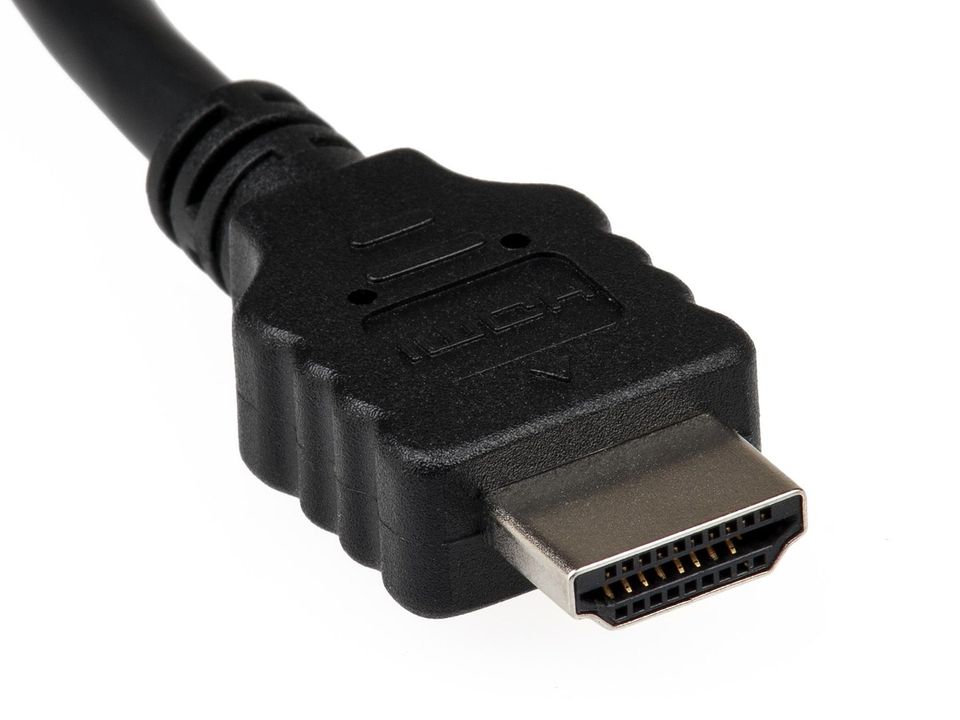
Check your ports first
Look at the side of your computer. Does it have HDMI? DisplayPort? Only USB-C? If it only has USB-C, you may need an adapter or a monitor that accepts USB-C. A missing cable is a classic mistake. Many monitors ship with one cable, and it may not match your computer.
Monitor or a second laptop screen?
A monitor adds screen space cheaply. If you work with a laptop all day, a second screen can save time switching between windows. A laptop riser and a separate keyboard can protect your neck too. If you are shopping for a home office, an office chair under $100 is the other piece worth getting right.
Walk away if
- The listing does not state resolution or panel type.
- It is a "gaming" monitor with no stand or ports shown.
- The seller will not take returns.
- Reviews say the brightness is uneven or has dead pixels and the shop will not refund.
If you are also planning a desk light, see desk lamp under $50.
Eye comfort
Set brightness near the room light. Keep the top of the screen near eye level. Take short breaks. For eye problems, ask an eye care professional.
Common mistakes
- Buying a big screen with low resolution.
- Forgetting the stand does not tilt enough.
- Assuming a cable is included.
- Believing "1ms response" means the monitor is fast in real use.
Quick questions
What is the best size monitor under $100?
For most desks, 22 to 24 inches at Full HD. Larger sizes look softer at this price.
Is IPS worth it on a cheap monitor?
Yes for most people. Colors look better from the side and it is easier on the eyes for long sessions.
Do I need 75 Hz or higher?
No for office use. It is a small bonus for games and smooth scrolling.
Can I use a TV as a monitor?
Often yes, but text can look soft up close. A real monitor is better for a desk.
More to read
Keep reading

A work backpack under $100: six checks before you buy
How to pick a work or school backpack under $100, from laptop fit to zips and straps, with a cost-per-day check so you know it is worth the price.
Manon Lambert3 min read
Shoes for standing all day under $100: what to look for
Shoes for standing all day under $100: how to check cushioning, fit and the sole, plus when an insole is cheaper than new shoes. General advice only.
Manon Lambert6 min read
Carry-on luggage under $100: what to check before you buy
How to choose a carry-on under $100, soft shell versus hard shell, the airline size rules to check, and the warning signs of weak luggage.
Hamza Idrissi3 min read
Mattress topper under $100: will it fix a bad bed
Will a mattress topper under $100 fix a bad bed? It can soften a firm mattress, but it cannot fix a sagging one. Here is how to tell and what to buy.
Hamza Idrissi4 min read
Office chair under $100: what to check before you sit
Office chair under $100: the five checks that matter, what a cheap chair usually gets wrong, and when to buy used instead of paying for a new one.
Manon Lambert6 min read

Winter coat under $100: how to stay warm for less
Winter coat under $100: warmth comes from fill, fit and layers more than the price. Here is how to pick a coat that lasts, with a cost per winter table.
Manon Lambert3 min read